资源简介
界面较为美观 代码注释完整 可继续进行进一步开发 有需要的可自行下载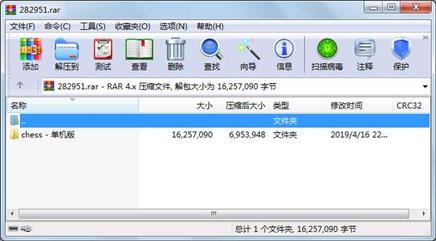
代码片段和文件信息
#!/usr/bin/env python
# -*- coding: utf-8 -*-
#
#  button.py
#
#  Copyright 2019 Nancyqinglan
#
#  This program is free software; you can redistribute it and/or modify
#  it under the terms of the GNU General Public License as published by
#  the Free Software Foundation; either version 2 of the License or
#  (at your option) any later version.
#
#  This program is distributed in the hope that it will be useful
#  but WITHOUT ANY WARRANTY; without even the implied warranty of
#  MERCHANTABILITY or FITNESS FOR A PARTICULAR PURPOSE.  See the
#  GNU General Public License for more details.
#
#  You should have received a copy of the GNU General Public License
#  along with this program; if not write to the Free Software
#  Foundation Inc. 51 Franklin Street Fifth Floor Boston
#  MA 02110-1301 USA.
#
#
import pygame
import pygame.font
import sys
import traceback
from pygame.locals import *

import math
import panda3d.core
import direct.showbase.Showbase
import direct.gui.OnscreenText
import direct.task.Task
import direct.interval.LerpInterval
import direct.gui.DirectCheckButton


pygame.font.init()
pygame.init()

class Mybutton():
	def draw_button(screen):

		‘‘‘
		绘制按键
		‘‘‘


		button_color = (163 80 21)
		pygame.draw.rect(screen button_color [1180 55 140 100] 5)
		pygame.draw.rect(screen button_color [1340 55 140 100] 5)
		pygame.draw.rect(screen button_color [1180 255 300 100] 5)
		pygame.draw.rect(screen button_color [1180 455 300 100] 5)
		pygame.draw.rect(screen button_color [1180 655 300 100] 5)

		font = pygame.font.Font(‘font.ttf‘ 45)
		#画‘认输’,‘求和’,‘悔棋’,‘重新开始’和‘退出’按钮
		defeat = font.render(“认  输“ True button_color)
		peace = font.render(“求  和“ True button_color)
		retract = font.render(“悔棋(Backspace)“ True button_color)
		restart = font.render(“重新开始(F5)“ True button_color)
		withdraw = font.render(“退出游戏(Esc)“ True button_color)
		screen.blit(defeat (1190 80))
		screen.blit(peace (1350 80))
		screen.blit(retract (1180 280))
		screen.blit(restart (1210 480))
		screen.blit(withdraw (1200 680))
属性 大小 日期 时间 名称
----------- --------- ---------- ----- ----
文件 2312 2019-04-16 09:33 chess - 单机版\button.py
文件 6205 2019-03-30 11:39 chess - 单机版\chess.py
文件 1042 2019-04-16 22:49 chess - 单机版\client.py
文件 3166656 2018-12-26 11:08 chess - 单机版\font.ttf
文件 5370864 2003-11-07 13:44 chess - 单机版\font1.TTF
文件 26437 2019-04-16 09:43 chess - 单机版\game_function.py
文件 2035854 2019-03-30 10:41 chess - 单机版\images\chessboard.bmp
文件 5130054 2019-03-29 11:03 chess - 单机版\images\map.bmp
文件 13046 2019-03-30 10:55 chess - 单机版\images\mute.jpg
文件 446466 2019-04-09 09:28 chess - 单机版\images\result.png
文件 12076 2019-03-30 10:56 chess - 单机版\images\voice.jpg
文件 2875 2019-04-16 09:43 chess - 单机版\main.py
文件 86 2019-03-29 11:38 chess - 单机版\server\config.txt
文件 5563 2019-03-29 11:39 chess - 单机版\server\server.py
文件 5689 2019-04-16 21:25 chess - 单机版\settings.py
文件 3607 2019-03-29 08:25 chess - 单机版\__pycache__\board.cpython-37.pyc
文件 1438 2019-04-16 09:33 chess - 单机版\__pycache__\button.cpython-37.pyc
文件 4087 2019-03-30 11:40 chess - 单机版\__pycache__\chess.cpython-37.pyc
文件 18504 2019-04-16 09:44 chess - 单机版\__pycache__\game_function.cpython-37.pyc
文件 1766 2019-04-16 09:43 chess - 单机版\__pycache__\main.cpython-37.pyc
文件 2463 2019-04-16 21:24 chess - 单机版\__pycache__\settings.cpython-37.pyc
目录 0 2019-04-09 09:28 chess - 单机版\images
目录 0 2019-03-29 11:05 chess - 单机版\server
目录 0 2019-04-16 21:24 chess - 单机版\__pycache__
目录 0 2019-04-16 22:49 chess - 单机版
----------- --------- ---------- ----- ----
16257090 25
- 上一篇:python3基础教程第三版高清
- 下一篇:混合地理加权回归python实现代码
相关资源
- Python-BDD100K大规模多样化驾驶视频数据
- Instant Pygame for Python Game Development How
- Biopython Tutorial
- Think Python 2nd
- 一个小小的表白程序(python)
- Python课堂笔记(高淇400集第一季)
- 二级考试python试题12套(包括选择题和
- pywin32_python3.6_64位
- python+ selenium教程
- PycURL(Windows7/Win32)Python2.7安装包 P
- 英文原版-Scientific Computing with Python
- 7.图像风格迁移 基于深度学习 pyt
- 基于Python的学生管理系统
- A Byte of Python(简明Python教程)(第
- Python实例174946
- Python 人脸识别
- Python 人事管理系统
- 基于python-flask的个人博客系统
- 计算机视觉应用开发流程
- python 调用sftp断点续传文件
- python socket游戏
- 基于Python爬虫爬取天气预报信息
- python函数编程和讲解
- Python开发的个人博客
- 基于python的三层神经网络模型搭建
- python实现自动操作windows应用
- python人脸识别(opencv)
- python 绘图(方形、线条、圆形)
- python疫情卡UN管控
- python 连连看小游戏源码
 川公网安备 51152502000135号
评论
共有 条评论