-
大小: 5.94KB文件类型: .rar金币: 1下载: 0 次发布日期: 2021-01-30
- 语言: Python
- 标签: tensorflow 机器学习 图像分类 猫狗识别
资源简介
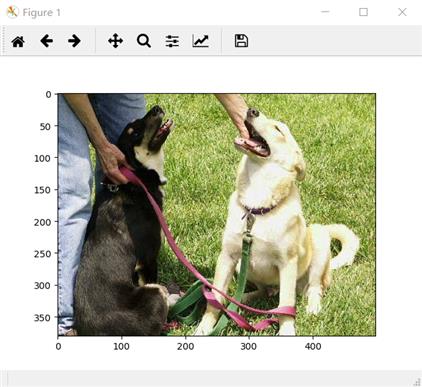
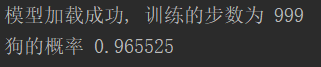
结果截图:
核心代码:
#训练函数:
import os
import numpy as np
import tensorflow as tf
import input_data
import model

N_CLASSES = 2  # 2个输出神经元,[1,0] 或者 [0,1]猫和狗的概率
IMG_W = 208  # 重新定义图片的大小,图片如果过大则训练比较慢
IMG_H = 208
BATCH_SIZE = 32  # 每批数据的大小
CAPACITY = 256
MAX_STEP = 1000  # 训练的步数,应当 >= 10000,因为训练过慢,只以1000次为例
learning_rate = 0.0001  # 学习率,建议刚开始的 learning_rate <= 0.0001


def run_training():
    # 数据集
    train_dir = 'd:/computer_sighting/try2_dogcat/train/'  # 训练集
    # logs_train_dir 存放训练模型的过程的数据,在tensorboard 中查看
    logs_train_dir = 'd:/computer_sighting/try2_dogcat/logs/'

    # 获取图片和标签集
    train, train_label = input_data.get_files(train_dir)
    # 生成批次
    train_batch, train_label_batch = input_data.get_batch(train,
                                                          train_label,
                                                          IMG_W,
                                                          IMG_H,
                                                          BATCH_SIZE,
                                                          CAPACITY)
    # 进入模型
    train_logits = model.inference(train_batch, BATCH_SIZE, N_CLASSES)
    # 获取 loss
    train_loss = model.losses(train_logits, train_label_batch)
    # 训练
    train_op = model.trainning(train_loss, learning_rate)
    # 获取准确率
    train__acc = model.evaluation(train_logits, train_label_batch)
    # 合并 summary
    summary_op = tf.summary.merge_all()
    sess = tf.Session()
    # 保存summary
    train_writer = tf.summary.FileWriter(logs_train_dir, sess.graph)
    saver = tf.train.Saver()

    sess.run(tf.global_variables_initializer())
    coord = tf.train.Coordinator()
    threads = tf.train.start_queue_runners(sess=sess, coord=coord)

    try:
        for step in np.arange(MAX_STEP):
            if coord.should_stop():
                break
            _, tra_loss, tra_acc = sess.run([train_op, train_loss, train__acc])

            if step % 50 == 0:
                print('Step %d, train loss = %.2f, train accuracy = %.2f%%' % (step, tra_loss, tra_acc * 100.0))
                summary_str = sess.run(summary_op)
                train_writer.add_summary(summary_str, step)

            if step % 2000 == 0 or (step   1) == MAX_STEP:
                # 每隔2000步保存一下模型,模型保存在 checkpoint_path 中
                checkpoint_path = os.path.join(logs_train_dir, 'model.ckpt')
                saver.save(sess, checkpoint_path, global_step=step)

    except tf.errors.OutOfRangeError:
        print('Done training -- epoch limit reached')
    finally:
        coord.request_stop()
    coord.join(threads)
    sess.close()


# train
run_training()
#模型和数据输入处理过程见附件啦
大概过程就是:建立好模型,训练大量图片,之后再用训练好的模型测试猫狗的图片就可以实现判别。代码很清晰,含有注释,比较好懂!
代码片段和文件信息
# coding=utf-8
import tensorflow as tf
from PIL import Image
import matplotlib.pyplot as plt
import numpy as np
import model
import os


# 从测试集中选取一张图片
def get_one_image(train):
    files = os.listdir(train)
    n = len(files)
    ind = np.random.randint(0 n)
    img_dir = os.path.join(train files[ind])
    image = Image.open(img_dir)
    plt.imshow(image)
    plt.show()
    image = image.resize([208 208])
    image = np.array(image)
    return image


def evaluate_one_image():
    test = ‘d:/computer_sighting/try2_dogcat/test/‘

    # 获取图片路径集和标签集
    image_array = get_one_image(test)

    with tf.Graph().as_default():
        BATCH_SIZE = 1  # 因为只读取一副图片 所以batch 设置为1
        N_CLASSES = 2  # 2个输出神经元,[1,0] 或者 [0,1]猫和狗的概率
        # 转化图片格式
        image = tf
属性 大小 日期 时间 名称
----------- --------- ---------- ----- ----
文件 2759 2019-09-13 14:08 evaluateCatOrDog.py
文件 4368 2019-09-13 13:44 input_data.py
文件 5425 2019-09-13 13:44 model.py
文件 2965 2019-09-13 14:08 training.py
----------- --------- ---------- ----- ----
15517 4
- 上一篇:基于MTCNN实现制作脸部VOC格式数据集
- 下一篇:NLP分词
相关资源
- Python机器学习实践指南中文版带书签
- Python机器学习及实践_从零开始通往
- Python机器学习及实践-从零开始通往
- Introduction to Machine Learning with Python英文
- Python-用python3opencv3做的中国车牌识别
- Python-各种对抗神经网络GAN大合集
- Python-Intel开源增强学习框架Coach
- Python-CENet用于2D医学图像分割的上下文
- 简单图像分类
- Hands-On.Machine.Learning.with.Scikit-Learn.an
- tensorflow-1.0.1-cp35-cp35m-win_amd64.whl
- Python Machine Learning( Python机器学习.
- python机器学习经典修正python3.x版
- Hands-On Machine Learning with Scikit-Learn Ke
- Python机器学习及实践高清
- Tensorflow与python3.7适配版本
- tensorflow-1.9.0-cp36-cp36m-win_amd64.whl
- Practical Machine Learning with Python (2018)
- 高清原版《Python深度学习》2018中文版
- python机器学习-不用kinect骨架检测代码
- scipy-1.4.1-cp35-cp35m-win_amd64.whl
- 《机器学习实战》python3完美运行代码
- Python-基于深度神经网络和蒙特卡罗树
- 创建画板,实时在线手写体识别
- 2019新书系列-Introduction to Python Progra
- tensorflow-1.10.0-cp27-cp27m-win32.whl
- 《Python深度学习》高清中文版带目录
- Python-SPNLearningAffinityviaSpatialPropagatio
- tensorflow-1.15.0-cp37-cp37m-win_amd64.whl
- tensorflow-2.0.0rc0-cp36-cp36m-linux_aarch64.w
 川公网安备 51152502000135号
评论
共有 条评论