资源简介
C#通过opc读取wincc数据的例子
【核心代码】
using OPCAutomation;
using System;
using System.Collections.Generic;
using System.ComponentModel;
using System.Data;
using System.Drawing;
using System.Linq;
using System.Net;
using System.Text;
using System.Windows.Forms;

namespace OPCDemo
{
    public partial class Form1 : Form
    {
        public Form1()
        {
            InitializeComponent();
        }

        #region 私有变量
        /// <summary>
        /// OPCServer Object
        /// </summary>
        OPCServer KepServer;
        /// <summary>
        /// OPCGroups Object
        /// </summary>
        OPCGroups KepGroups;
        /// <summary>
        /// OPCGroup Object
        /// </summary>
        OPCGroup KepGroup;
        /// <summary>
        /// OPCItems Object
        /// </summary>
        OPCItems KepItems;
        /// <summary>
        /// OPCItem Object
        /// </summary>
        OPCItem[] KepItem;
        /// <summary>
        /// 主机IP
        /// </summary>
        string strHostIP = "";
        /// <summary>
        /// 主机名称
        /// </summary>
        string strHostName = "";
        /// <summary>
        /// 连接状态
        /// </summary>
        bool opc_connected = false;
        /// <summary>
        /// 客户端句柄
        /// </summary>
        int itmHandleClient = 0;
        /// <summary>
        /// 服务端句柄
        /// </summary>
        int itmHandleServer = 0;
        #endregion

        #region 方法
        /// <summary>
        /// 枚举本地OPC服务器
        /// </summary>
        private void GetLocalServer()
        {
            //获取本地计算机IP,计算机名称
            IPHostEntry IPHost = Dns.Resolve(Environment.MachineName);
            if (IPHost.AddressList.Length > 0)
            {
                strHostIP = IPHost.AddressList[0].ToString();
            }
            else
            {
                return;
            }
            //通过IP来获取计算机名称,可用在局域网内
            IPHostEntry ipHostEntry = Dns.GetHostByAddress(strHostIP);
            strHostName = ipHostEntry.HostName.ToString();

            //获取本地计算机上的OPCServerName
            try
            {
                KepServer = new OPCServer();
                object serverList = KepServer.GetOPCServers(strHostName);

                foreach (string turn in (Array)serverList)
                {
                    cmbServerName.Items.Add(turn);
                }

                cmbServerName.SelectedIndex = 0;
              //  btnConnServer.Enabled = true;
            }
            catch (Exception err)
            {
                MessageBox.Show("枚举本地OPC服务器出错:"   err.Message, "提示信息", MessageBoxButtons.OK, MessageBoxIcon.Warning);
            }

        }


        /// <summary>
                /// 设置组属性
                /// </summary>
        private void SetGroupProperty()
        {
            KepServer.OPCGroups.DefaultGroupIsActive = true;
            KepServer.OPCGroups.DefaultGroupDeadband = 0;
            KepServer.OPCGroups.DefaultGroupUpdateRate = 200;
            KepGroup.UpdateRate = 150;
            KepGroup.IsActive = true;
            KepGroup.IsSubscribed = true;//使用订阅功能
        }

        private void Form1_Load(object sender, EventArgs e)
        {
            KepItem = new OPCItem[4];
            GetLocalServer();
        }


        /// <summary>
                /// 每当项数据有变化时执行的事件
                /// </summary>
                /// <param name="TransactionID">处理ID</param>
                /// <param name="NumItems">项个数</param>
                /// <param name="ClientHandles">项客户端句柄</param>
                /// <param name="ItemValues">TAG值</param>
                /// <param name="Qualities">品质</param>
                /// <param name="TimeStamps">时间戳</param>
        void KepGroup_DataChange(int TransactionID, int NumItems, ref Array ClientHandles, ref Array ItemValues, ref Array Qualities, ref Array TimeStamps)
        {


            //为了测试,所以加了控制台的输出,来查看事物ID号
            //Console.WriteLine("********" TransactionID.ToString() "*********");
            for (int i = 1; i <= NumItems; i  )
            {
                MessageBox.Show(ClientHandles.GetValue(i).ToString()   " _ "  ItemValues.GetValue(i).ToString());
                //Console.WriteLine("********"   ItemValues.GetValue(i).ToString()   "*********");
                //this.txtTagValue.Text = ItemValues.GetValue(i).ToString();
                //this.txtQualities.Text = Qualities.GetValue(i).ToString();
                //this.txtTimeStamps.Text = TimeStamps.GetValue(i).ToString();
            }


        }

        /// 写入TAG值时执行的事件
                /// </summary>
                /// <param name="TransactionID"></param>
                /// <param name="NumItems"></param>
                /// <param name="ClientHandles"></param>
                /// <param name="Errors"></param>
        void KepGroup_AsyncWriteComplete(int TransactionID, int NumItems, ref Array ClientHandles, ref Array Errors)
        {
            /*
            lblState.Text = "";
            for (int i = 1; i <= NumItems; i  )
            {
                lblState.Text  = "Tran:"   TransactionID.ToString()   "   CH:"   ClientHandles.GetValue(i).ToString()   "   Error:"   Errors.GetValue(i).ToString();
            }
            */
        }


        /// <summary>
                /// 创建组
                /// </summary>
        private bool CreateGroup()
        {
            try
            {
                KepGroups = KepServer.OPCGroups;
                KepGroup = KepGroups.Add("ceshi");

                SetGroupProperty();

                KepGroup.DataChange  = new DIOPCGroupEvent_DataChangeEventHandler(KepGroup_DataChange);
                KepGroup.AsyncWriteComplete  = new DIOPCGroupEvent_AsyncWriteCompleteEventHandler(KepGroup_AsyncWriteComplete);
                //添加组成员
                {
                    KepItems = KepGroup.OPCItems;


                    KepItem[0] = KepItems.AddItem("test2_bool",0);
                    KepItem[1] = KepItems.AddItem("test1_int", 1);
                }

            }
            catch (Exception err)
            {
                MessageBox.Show("创建组出现错误:"   err.Message, "提示信息", MessageBoxButtons.OK, MessageBoxIcon.Warning);
                return false;
            }
            return true;
        }


        /// <summary>
        /// 列出OPC服务器中所有节点
        /// </summary>
        /// <param name="oPCBrowser"></param>
        private void RecurBrowse(OPCBrowser oPCBrowser)
        {
            //展开分支
            oPCBrowser.ShowBranches();
            //展开叶子
            oPCBrowser.ShowLeafs(true);
            foreach (object turn in oPCBrowser)
            {
                listBox1.Items.Add(turn.ToString());
            }
        }

        /// <summary>
                /// 连接OPC服务器
                /// </summary>
                /// <param name="remoteServerIP">OPCServerIP</param>
                /// <param name="remoteServerName">OPCServer名称</param>
        private bool ConnectRemoteServer(string remoteServerIP, string remoteServerName)
        {
            try
            {
                KepServer.Connect(remoteServerName, remoteServerIP);

                if (KepServer.ServerState == (int)OPCServerState.OPCRunning)
                {
                    lbl1.Text = "已连接到-"   KepServer.ServerName   "   ";
                }
                else
                {
                    //这里你可以根据返回的状态来自定义显示信息,请查看自动化接口API文档
                    lbl1.Text = "状态:"   KepServer.ServerState.ToString()   "   ";
                }
            }
            catch (Exception err)
            {
                MessageBox.Show("连接远程服务器出现错误:"   err.Message, "提示信息", MessageBoxButtons.OK, MessageBoxIcon.Warning);
                return false;
            }
            return true;
        }

        private void btnConnLocalServer_Click_1(object sender, EventArgs e)
        {
            try
            {

                // OPC.SimaticHMI.CoRtHmiRTm.1
                //  OPCServer.WinCC.1

                if (!ConnectRemoteServer("127.0.0.1", txtConStr.Text))
                {
                    return;
                }

                opc_connected = true;


                RecurBrowse(KepServer.CreateBrowser());

                if (!CreateGroup())
                {
                    MessageBox.Show("创建组失败!");
                    return;
                }


            }
            catch (Exception err)
            {
                MessageBox.Show("初始化出错:"   err.Message, "提示信息", MessageBoxButtons.OK, MessageBoxIcon.Warning);
            }
        }

        private void Form1_FormClosing(object sender, FormClosingEventArgs e)
        {
            if (!opc_connected)
            {
                return;
            }

            if (KepGroup != null)
            {
                KepGroup.DataChange -= new DIOPCGroupEvent_DataChangeEventHandler(KepGroup_DataChange);
            }

            if (KepServer != null)
            {
                KepServer.Disconnect();
                KepServer = null;
            }

            opc_connected = false;
        }

        private void bntWrite_Click(object sender, EventArgs e)
        {
            Random rd = new Random();

            KepItem[1].Write(rd.Next(100, 500));
        }
    }
}
#endregion
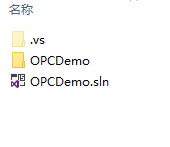
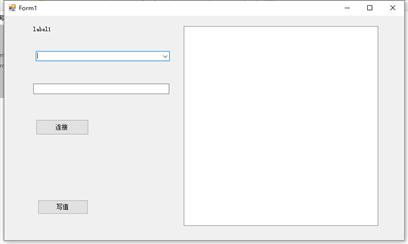
代码片段和文件信息
using OPCAutomation;
using System;
using System.Collections.Generic;
using System.ComponentModel;
using System.Data;
using System.Drawing;
using System.Linq;
using System.Net;
using System.Text;
using System.Windows.Forms;

namespace OPCDemo
{
    public partial class Form1 : Form
    {
        public Form1()
        {
            InitializeComponent();
        }

        #region 私有变量
        ///
        /// OPCServer object
        ///
        OPCServer KepServer;
        ///
        /// OPCGroups object
        ///
        OPCGroups KepGroups;
        ///
        /// OPCGroup object
        ///
        OPCGroup KepGroup;
        ///
        /// OPCItems object
        ///
属性 大小 日期 时间 名称
----------- --------- ---------- ----- ----
..A..H. 50176 2020-03-19 13:47 OPCDemo1\.vs\OPCDemo\v15\.suo
文件 0 2020-02-27 18:44 OPCDemo1\.vs\OPCDemo\v15\Server\sqlite3\db.lock
文件 577536 2020-02-27 23:51 OPCDemo1\.vs\OPCDemo\v15\Server\sqlite3\storage.ide
文件 32768 2020-03-19 10:34 OPCDemo1\.vs\OPCDemo\v15\Server\sqlite3\storage.ide-shm
文件 4120032 2020-03-19 12:23 OPCDemo1\.vs\OPCDemo\v15\Server\sqlite3\storage.ide-wal
文件 233472 2004-10-12 12:10 OPCDemo1\OPCDemo\bin\Debug\OPCDAAuto.dll
文件 17920 2020-02-28 00:36 OPCDemo1\OPCDemo\bin\Debug\OPCDemo.exe
文件 34304 2020-02-28 00:36 OPCDemo1\OPCDemo\bin\Debug\OPCDemo.pdb
文件 11081 2020-02-28 00:36 OPCDemo1\OPCDemo\Form1.cs
文件 5089 2020-02-28 00:36 OPCDemo1\OPCDemo\Form1.Designer.cs
文件 5817 2020-02-28 00:36 OPCDemo1\OPCDemo\Form1.resx
文件 14713 2020-02-27 22:03 OPCDemo1\OPCDemo\Form2.cs
文件 1472 2020-02-27 20:41 OPCDemo1\OPCDemo\Form2.Designer.cs
文件 5817 2020-02-27 20:41 OPCDemo1\OPCDemo\Form2.resx
文件 827 2020-02-27 18:44 OPCDemo1\OPCDemo\obj\Debug\DesignTimeResolveAssemblyReferences.cache
文件 6935 2020-02-27 20:52 OPCDemo1\OPCDemo\obj\Debug\DesignTimeResolveAssemblyReferencesInput.cache
文件 28672 2020-02-28 00:36 OPCDemo1\OPCDemo\obj\Debug\Interop.OPCAutomation.dll
文件 42 2020-03-19 10:34 OPCDemo1\OPCDemo\obj\Debug\OPCDemo.csproj.CoreCompileInputs.cache
文件 775 2020-02-28 00:36 OPCDemo1\OPCDemo\obj\Debug\OPCDemo.csproj.FileListAbsolute.txt
文件 1012 2020-02-28 00:36 OPCDemo1\OPCDemo\obj\Debug\OPCDemo.csproj.GenerateResource.cache
文件 778 2020-02-28 00:36 OPCDemo1\OPCDemo\obj\Debug\OPCDemo.csproj.ResolveComReference.cache
文件 10576 2020-02-28 09:30 OPCDemo1\OPCDemo\obj\Debug\OPCDemo.csprojAssemblyReference.cache
文件 17920 2020-02-28 00:36 OPCDemo1\OPCDemo\obj\Debug\OPCDemo.exe
文件 180 2020-02-28 00:36 OPCDemo1\OPCDemo\obj\Debug\OPCDemo.Form1.resources
文件 34304 2020-02-28 00:36 OPCDemo1\OPCDemo\obj\Debug\OPCDemo.pdb
文件 180 2020-02-28 00:36 OPCDemo1\OPCDemo\obj\Debug\OPCDemo.Properties.Resources.resources
文件 3794 2020-02-27 20:52 OPCDemo1\OPCDemo\OPCDemo.csproj
文件 228 2020-02-27 22:03 OPCDemo1\OPCDemo\OPCDemo.csproj.user
文件 488 2020-02-27 18:44 OPCDemo1\OPCDemo\Program.cs
文件 1312 2020-02-27 18:44 OPCDemo1\OPCDemo\Properties\AssemblyInfo.cs
............此处省略22个文件信息
相关资源
- C# OPC 数据采集 .rar
- C#操作OPC包含KepServer4.5软件 OPCAutomat
- c# 实现pcap格式解析,方便Wireshark抓包
- PCA主成分分析winform实现
- PC微信加密图片解密源码C#
- ABB_PC_SDK_controller ABB robotarm
- 工业OPC客户端读取,并存SQL
- C# PLC OPC 通讯统一方式
- Unity Windows Speech
- 从海康的ps流中提取h264数据模拟ehom
- C#利用SharpPcap发送以太网报文以太网原
- C# 研华PCI1716板卡接口程序
- C#使用HttpClient
- c# 代码编辑控件(代码着色控件)
- C#可配置数据源的SPC代码
- C#版本opc da 源码最低分分享
- Interop.OPCAutomation.dll
- C#使用OpcNetApi_dll和OpcNetApi_Com_dll操作
- c#实现HttpClient拼接multipart/form-data形式
- WPF中用于嵌入其他进程窗口的自定义
- Emit常用Opcode指令使用方法
- C# udp服务器收发、点对点收发
- C#版的FtpClient客户端Socket实现(可以登
- 操作系统进程管理系统课程设计C#
- C#通过服务端和GPRS通讯
- C# 串口调试助手源码(自动搜索PC可用
- c#捕获数据包Winpcap
- 基于OPCDAAuto.dll的opc运用的简单
- 如何在WPF应用程序中通过HttpClient调用
- C#客服端与服务器通讯TcpClient和TcpLi
 川公网安备 51152502000135号
评论
共有 条评论